Run from WhatsApp.
A website and checkout for any business that takes orders — with every order, payment and stock change run from the WhatsApp chat you already use. No code, no app, no dashboard.
Made for
- Cafés
- Bakeries
- Boutiques
- Jewellers
- Kirana stores
- D2C brands
A short film of one shop’s first day. A seller in Jaipur messages “Start my shop” on WhatsApp, answers a few questions and replies BUILD. Sell Front builds the shop, Johri Lane, and the seller publishes it. A photo sent with a caption puts a product on the shelf. A buyer in Nashik opens the shop, picks a pair of earrings, pastes her address, chooses cash on delivery and places the order. The order arrives back in the seller’s WhatsApp thread with two buttons, Accept and Out of stock.


The problem
- Orders
ORD-7K3QX9
Kota Doria · Indigo × 2 · Nashik
Accepted - Inventory
3 → 1
Sold on the shop, reason kept
Counted - Cash on delivery
At the door
Fee shown before the order
Delivered - GST invoice
INV-00042
CGST + SGST, or IGST, by itself
Tax invoice - Payments
Paid · UPI
UTR matched, recorded
Received - Storefront
One link
Set up in an afternoon
Live
01 The product
One order, three views. Your customers only ever see the storefront.
-
For your customers
The storefront
Checkout with UPI or cash on delivery, and an order page that updates itself.
-
For you
WhatsApp, as the admin
Orders arrive with buttons. One typed line changes stock.
-
For you
The seller app
Catalogue, design and numbers, from the home screen. No app store.
02 WhatsApp is the admin
Run a morning yourself. Every button and command here works as it does in the product.
- 01 An order is a message. Tap Accept on the order above.
- 02 The morning digest. Send stock BDS-8 +20, or type your own.
- 03 Ask in your own words. Ask how the day is going.
- 04 Ship it, and the buyer knows. Paste the courier’s AWB.
- 05 One thread ran the shop. Nothing else was opened.
Try typing
Commands are exact and need no AI: stock <SKU> 12 sets, +5
adds, -2 removes, stock <SKU> asks. Anything else goes to
the assistant.
03 The storefront
Its own colours, type and photographs, never Sell Front’s. Open something and put it in the cart.
Free delivery above ₹999 · Cash on delivery
Johri Lane
Cart 0

Kundan, polki and pearls
The wedding edit
Shop now

Bestsellers View all
- Cash on delivery
- 7 days to return or exchange
DIWALI10 · 10% off orders over ₹999
Alpha Handlooms
Cart 0

Sarees and home, from the loom
Woven, printed, worn
Shop now


Bestsellers View all
- Cash on delivery
- 7 days to return or exchange
Order by 11 am · Delivered the same day in Pune
Kadak Bakehouse
Cart 0

Baked this morning, in small batches
Out of the oven at seven
Shop now


Bestsellers View all
- Cash on delivery
- 7 days to return or exchange
04 AI Restyle
One sentence in the same thread. It drafts, you preview, and nothing reaches buyers until you publish.
- 1 Ask
- 2 Draft
- 3 Preview
- 4 Publish
- 5 Undo
make it festive for Diwali
Draft ready · 4 changes
- A toran over the door
- A Diwali Edit banner
- Marigold accents
- The saree first
Preview link · private, only you
hero ko maroon background do
Draft ready · 1 change
- The hero takes a maroon ground; its text is re-derived to stay readable
Preview link · private, only you
Hindi mein buttons
Draft ready · 3 changes
- “Shop now” → अभी खरीदें
- “Add to cart” → कार्ट में डालें
- The headline, in Hindi
Preview link · private, only you
The live shop is untouched until you say so.
This preview only knows the three requests above. Try one of them; the real assistant takes anything.
Scroll, and the draft goes on. Or drag the handle.
The Diwali Edit
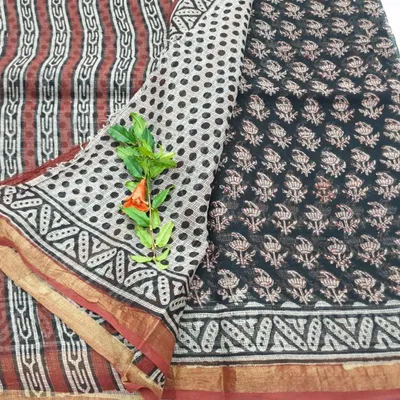
Sarees and home, from the loom करघे से, साड़ियाँ और घर
Shop now अभी खरीदें-
-
₹1,099Add to cart कार्ट में डालें -

-



- v1 The look you opened with
- v2 Diwali published
- v2 Maroon hero published
- v2 Hindi words published
- Every published look is kept. Any of the last eight can come back.
05 How it works
Three steps, all on the phone you are holding.
-
Sign in on WhatsApp
Send your number; a one-time link comes back. No password, no app.
-
Add what you sell
A photo, captioned with its name, is on your shop as it lands.
-
Share one link
Orders come back to the same chat, with Accept and Out of stock.

06 Made for
Whatever you sell, the shop is online and the orders run from WhatsApp.
-
Cafés
The morning’s orders arrive as WhatsApp messages, each with Accept and Out of stock. Answer between two customers.
- Orders in WhatsApp
- UPI or cash on delivery
-
Bakeries
A batch sells out by noon. One line,
stock CUP-CHO 0, and the shop says so.- Stock by chat
-
Boutiques
New arrivals photographed in the afternoon are on the shop by evening. Before Diwali, ask for a festive look.
- Photos to products
- AI Restyle
-
Jewellers
Bills say Invoice until you add a GSTIN; after that they are tax invoices by themselves.
- GST invoices
-
Kirana stores
Regulars paste an address and pay cash at the door. Nobody makes an account; nobody needs a password.
- Cash on delivery
- No buyer accounts
-
D2C brands
Your own domain and your own look, and every product exports as the same CSV you imported.
- Own domain
- CSV export


07 FAQ
Answered from the seller manual, as the product works today.
Something else? Write to the team and we will get back to you.
admin@sellfront.in What do I need to start?
A phone with WhatsApp and something to sell. You sign in with a one-time link; there is no password, no app-store install and no theme code. We set the first shop up with you.
Do my buyers need an app or an account?
No. A buyer is a phone number at checkout. After ordering they get a link to their order page, and the link itself is the key: status, invoice and a return request, with no login.
How does cash on delivery work?
It is on from day one. The buyer sees the cash-on-delivery fee before ordering, the money is confirmed when the parcel is handed over, and the courier remits it straight to you. Sell Front never holds it.
Can I take online payments too?
Cash on delivery works from the first day. Online payment by UPI and card switches on once your payout account is verified; until then buyers see cash on delivery and, if you have set one, your UPI id.
Do I need a GSTIN?
Not to start. Without one your documents are titled “Invoice”. Add a GSTIN later and every invoice from then on is a tax invoice, with CGST and SGST inside your state and IGST outside it.
How do I ship orders?
With the courier you already use. Mark the order shipped and paste the AWB; the buyer gets it on WhatsApp the same moment. A courier integration is next release.
What does it cost, and can I leave?
There is no public price yet; we are settling it with the first sellers. You can leave at any time: products export as CSV, orders too, and your domain is yours to point elsewhere.
08 Early access
We are opening to a first group of businesses. Send this, and someone from our team writes back on WhatsApp.
Sent successfully.
Thank you, friend. We will write back on WhatsApp at .